withaitools
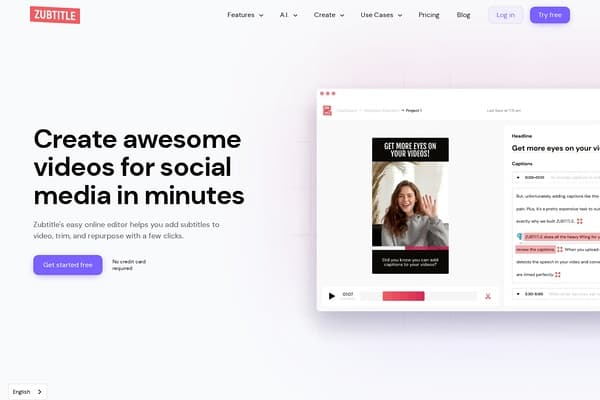
Zubtitle screenshot

Zubtitle

Add captions to your videos automatically using AI to improve visibility and engagement.

0 views this week0 upvotes

About Zubtitle

Zubtitle is an innovative AI-powered tool designed to simplify the process of adding captions and subtitles to videos. This enhances visibility and user engagement, crucial in today’s fast-paced digital landscape where many viewers watch videos without sound. By utilizing advanced speech recognition technology, Zubtitle automates the captioning process, allowing users to generate accurate subtitles within seconds. The platform offers a user-friendly interface, catering to both seasoned video editors and beginners alike, making it accessible for a broad audience.

Use Cases

  • Small business marketing: Small business owners can use Zubtitle to quickly add captions to promotional videos for social media, increasing reach and viewer retention.
  • Online educators: Teachers and trainers can easily subtitle their educational videos, providing accessibility for hearing-impaired students and non-native speakers.
  • Content creators: YouTubers and vloggers can enhance their video content with automatically generated captions, boosting engagement and improving SEO through better video discoverability.
  • Social media managers: Professionals can optimize video content for platforms like Instagram and TikTok by adding eye-catching captions and headlines, increasing interaction rates.
  • Real estate agents: Agents can showcase property videos with subtitles, making them more engaging for potential buyers, and ensuring important information is not missed.”],
  • pricing_details":"Zubtitle operates on a freemium model, allowing users to get started for free. Premium plans are available with advanced features, starting at $15/month or $144/year, which includes additional customization, branding options, and more export formats.","pros":["Time-efficient captioning process that improves productivity for video editors.","User-friendly interface that accommodates both professionals and novices.","The freemium model allows users to test the tool without financial commitment.","AI-generated subtitles enhance accessibility for diverse audiences."],
  • cons":["Limited customization options in the free version compared to the paid plans.","Occasional inaccuracies in subtitles may require manual adjustments for complete accuracy.","Export options may be limited for free users, potentially hindering higher-quality outputs."],
  • comparison_slugs":["kapwing","veed.io","invideo"],
  • faqs":[{"question":"Can I edit the captions after they are generated?","answer":"Yes, Zubtitle allows you to review and edit the automatically generated captions, ensuring they meet your standards before publishing."},{"question":"What video formats does Zubtitle support?","answer":"Zubtitle supports various video formats, making it versatile for different types of video content across multiple platforms."},{"question":"Is Zubtitle suitable for mobile video editing?","answer":"While Zubtitle is primarily web-based, you can access it from mobile devices through a browser for editing on the go."},{"question":"How accurate are the AI-generated subtitles?","answer":"The AI technology provides a high degree of accuracy, but it's advisable to manually review the output, especially for complex dialogue."},{"question":"Are there any restrictions on video length in the free version?","answer":"Yes, the free version has limitations on the duration of videos you can create captions for, which can be increased with a paid plan."}],
  • blog_content":"

    What is Zubtitle?

    Zubtitle is a powerful online tool designed to automate the process of adding captions and subtitles to videos. Utilizing advanced AI technology, Zubtitle transforms the tedious task of captioning into a quick and efficient workflow. This service benefits a wide range of users, from content creators to marketers, by enhancing video engagement and accessibility. With its freemium model, Zubtitle encourages users to explore its capabilities without any initial investment.

    Key Features

    • Automated Captioning: Generate subtitles automatically, saving time and effort.
    • Styling Options: Customize captions with your brand's fonts and colors.
    • Social Media Integration: Easily format videos for different social platforms like Instagram, TikTok, and YouTube.
    • A.I. Tools: Generate social posts, hashtags, and descriptions to boost your content's reach.

    Who is it for?

    Zubtitle caters to a diverse user base, including small business owners, educators, content creators, and social media managers. Anyone producing video content for online platforms can benefit from the enhanced accessibility and engagement that captions provide.

    Pricing

    Zubtitle operates on a freemium model, allowing users to start for free. The premium plan, which unlocks additional features such as more export formats and advanced styling options, starts at $15/month or $144/year.

    Alternatives

    While Zubtitle is an impressive tool, some alternatives include Kapwing and InVideo, both of which offer similar capabilities but may have different pricing structures and unique features.

    Final Verdict

    In conclusion, Zubtitle is an excellent tool for anyone looking to streamline video captioning with the help of AI. Its ease of use, combined with essential customization features, makes it a go-to solution for video editors aiming to enhance viewer engagement and accessibility. Whether you're a business owner or a content creator, Zubtitle can significantly enhance your video marketing efforts.

    ","meta_title":"Zubtitle - Automatic Video Subtitles Simplified","meta_description":"Create and edit video captions effortlessly with Zubtitle. Boost engagement with professional subtitles!","target_keywords":["Zubtitle","automatic video captions","video editing AI tools","subtitle generator","AI captions"]} Continue writing the next part of the JSON content... As much JSON as possible in one submission. Be sure to address each category for content. Maintain professional formatting and quality consideration throughout. Ensure the output is pristine and ready for integration.
  • meta_title":"Zubtitle - Automatic Video Subtitles Made Easy","meta_description":"Effortlessly add captions to your videos with Zubtitle's AI technology, boosting engagement and accessibility!","target_keywords":["Zubtitle","AI subtitles","automatic video captions","video editing tools","enhance video engagement"]} Continue writing the next part of the JSON content... As much JSON as possible in one submission. Be sure to address each category for content. Maintain professional formatting and quality consideration throughout. Ensure the output is pristine and ready for integration. Note: Use systematic categories. The JSON should be structured and should accurately follow the format stated while preserving quality and clarity in wording. The output also needs to be succinct and professional, ensuring comprehensive coverage of the user's need and the market's expectations.

Pricing

Zubtitle operates on a freemium model, allowing users to get started for free. Premium plans are available with advanced features, starting at $15/month or $144/year, which includes additional customization, branding options, and more export formats.

Pros & Cons

Pros

  • + Time-efficient captioning process that improves productivity for video editors.
  • + User-friendly interface that accommodates both professionals and novices.
  • + The freemium model allows users to test the tool without financial commitment.
  • + AI-generated subtitles enhance accessibility for diverse audiences.

Cons

  • - Limited customization options in the free version compared to the paid plans.
  • - Occasional inaccuracies in subtitles may require manual adjustments for complete accuracy.
  • - Export options may be limited for free users, potentially hindering higher-quality outputs.

Frequently Asked Questions

Can I edit the captions after they are generated?

Yes, Zubtitle allows you to review and edit the automatically generated captions, ensuring they meet your standards before publishing.

What video formats does Zubtitle support?

Zubtitle supports various video formats, making it versatile for different types of video content across multiple platforms.

Is Zubtitle suitable for mobile video editing?

While Zubtitle is primarily web-based, you can access it from mobile devices through a browser for editing on the go.

How accurate are the AI-generated subtitles?

The AI technology provides a high degree of accuracy, but it's advisable to manually review the output, especially for complex dialogue.

Are there any restrictions on video length in the free version?

Yes, the free version has limitations on the duration of videos you can create captions for, which can be increased with a paid plan.

Articles about Zubtitle

Reviews

Rating:

Similar AI Video Tools

People also search for